
Updated November 2026. Prices are US East (N. Virginia) list rates; check the S3 pricing page for your Region.
S3 cost optimization starts with an uncomfortable fact: the cheapest storage class is about 23 times cheaper than the default, and most buckets never leave the default. CloudZero puts the spread at $0.023 per GB-month for S3 Standard down to $0.00099 for Glacier Deep Archive, a range most finance teams do not know exists.
The catch is that cheaper classes charge in other ways: retrieval fees, minimum storage durations, minimum object sizes and per-object transition fees. Move the wrong data and the bill goes up. This guide covers the prices, the traps, a worked example and a routine that keeps S3 lean.
What S3 actually charges for
Your S3 bill has four parts:
| Charge | How it bills | Typical driver |
|---|---|---|
| Storage | Per GB-month, by class | Data volume and class |
| Requests | Per 1,000 requests, by type and class | Small files, LIST-heavy apps |
| Retrieval and early deletion | Per GB read from cold classes; remaining days if deleted early | Reading archived data |
| Data transfer | Per GB leaving AWS or crossing Regions | Public downloads, replication |
Storage is usually the biggest line, which is why class choice matters most. AWS Cost Explorer grouped by usage type splits S3 into these parts.
Storage class prices
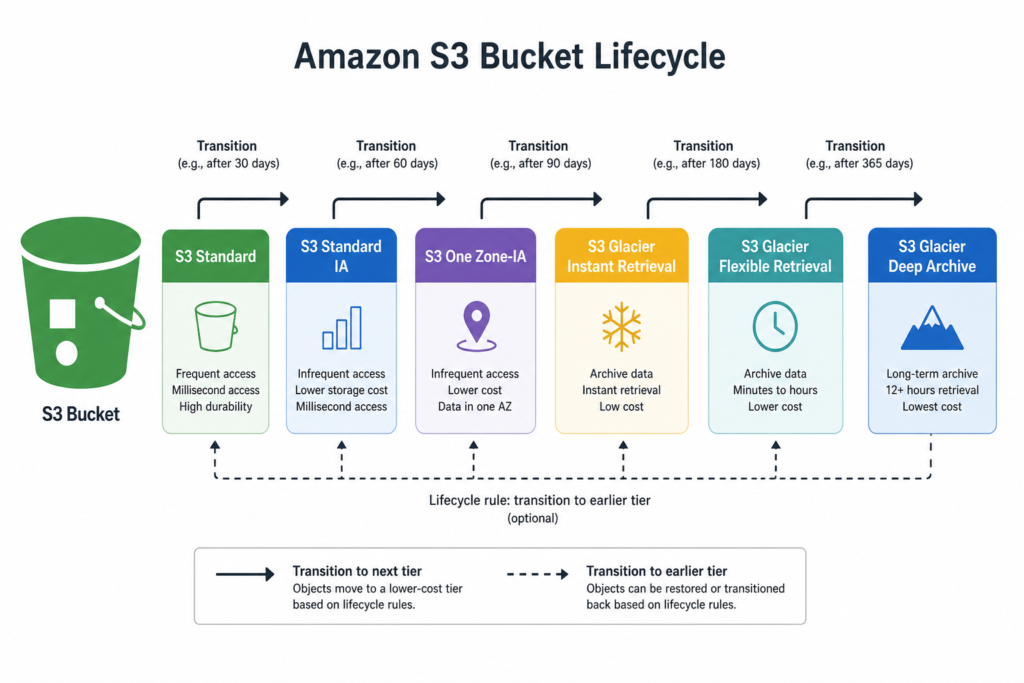
| Class | Storage per GB-month | Retrieval | Minimum duration | Minimum billable object |
|---|---|---|---|---|
| S3 Standard (first 50 TB) | $0.023 | None | None | None |
| S3 Intelligent-Tiering | $0.023 down to $0.00099, plus monitoring fee | None | None | Objects under 128 KB not tiered |
| S3 Standard-IA | $0.0125 | $0.01 per GB | 30 days | 128 KB |
| S3 One Zone-IA | $0.01 | $0.01 per GB | 30 days | 128 KB |
| S3 Glacier Instant Retrieval | $0.004 | $0.03 per GB | 90 days | 128 KB |
| S3 Glacier Flexible Retrieval | $0.0036 | Bulk free; standard $0.01 per GB | 90 days | 40 KB metadata overhead per object |
| S3 Glacier Deep Archive | $0.00099 | Bulk from $0.0025 per GB | 180 days | 40 KB metadata overhead per object |
Prices from ManageEngine’s October 2026 check of US East rates, with minimums from AWS and CloudZero. Standard also tiers down with volume: $0.022 per GB for the next 450 TB and $0.021 above 500 TB.
S3 Express One Zone is the outlier in the other direction, at roughly $0.11 per GB-month for single-digit millisecond latency. Use it for performance, not to save money.
The fees that catch people
Minimum object size. IA and Glacier Instant classes bill every object as at least 128 KB. A bucket of 10 KB thumbnails moved to Standard-IA pays for 12.8 times the data it holds.
Minimum duration. Delete or overwrite an object before 30, 90 or 180 days and AWS charges an early deletion fee for the remaining days. Short-lived data belongs in Standard.
Retrieval fees. Glacier Instant Retrieval stores for $0.004 but charges $0.03 per GB read. Data read every month can cost more there than in Standard-IA.
Transition requests. Lifecycle transitions are billed per object. A DEV Community breakdown lists $0.02 per 1,000 transition requests into Glacier Instant Retrieval and $0.03 into Flexible Retrieval. A bucket of hundreds of millions of tiny objects can spend more moving them than it ever saves.
Monitoring fees. Intelligent-Tiering charges $0.0025 per 1,000 objects a month for monitoring. At 100 million objects that is $250 a month before any saving.
When Intelligent-Tiering is the right answer
Intelligent-Tiering moves objects between Frequent, Infrequent and Archive Instant tiers automatically, with no retrieval charges and no fee for moving between tiers. Optional archive tiers go colder still.
It wins when access patterns are unknown or change, and objects are large enough for the monitoring fee to be small relative to storage. It loses for:
- Buckets dominated by objects under 128 KB, which are never tiered.
- Data you already know is cold, where a direct lifecycle rule to Glacier avoids the monitoring fee.
- Data you know is hot, which gains nothing.
A rough test: if the average object is a few megabytes or more and you cannot predict access, Intelligent-Tiering is usually the safe default.
A worked example: 200 TB of mixed data
Take a hypothetical bucket of 200 TB in S3 Standard, where access logs show 120 TB has not been read in 90 days.
- All Standard: 50 TB at $0.023 plus 150 TB at $0.022 is about $4,557 a month.
- Move the cold 120 TB to Glacier Instant Retrieval: 80 TB Standard (about $1,853) plus 120 TB at $0.004 (about $492) is about $2,345 a month.
- Saving: about $2,212 a month, or 49%.
Now the costs. If the cold data is 12 million objects averaging 10 MB, the one-time transition is about $240. If the team reads back 5 TB a month, retrieval adds about $154 a month. The net saving stays above $2,000 a month. If instead they read back 60 TB a month, retrieval would cost about $1,840 and erase most of it. Check access logs before you move anything.
Lifecycle rules that pay for themselves
A lifecycle rule moves or deletes objects by age, so savings happen without anyone remembering. Rules worth adding to almost every account:
- Abort incomplete multipart uploads after 7 days. Abandoned parts bill invisibly.
- Expire noncurrent versions on versioned buckets after your retention period. Versioning without expiry quietly multiplies storage.
- Transition logs and backups by age, for example to Standard-IA at 30 days and Glacier at 90, then delete at the end of retention.
- Delete expired delete markers to keep LIST operations fast and cheap.
Test each rule on a prefix first. A misconfigured expiration rule is one of the few ways to lose data at scale by accident.
Find where the money is
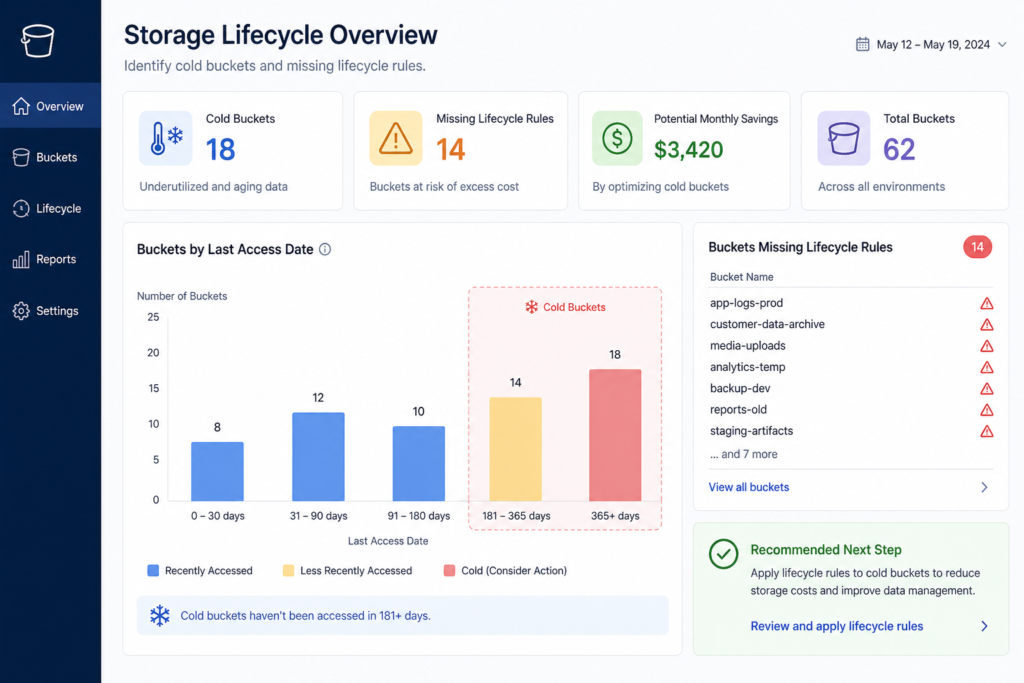
S3 Storage Lens ranks buckets by size, growth, noncurrent version bytes, incomplete uploads and missing lifecycle rules, across every account in an organization.
Storage Class Analysis watches access patterns on a bucket or prefix and shows whether data is read often enough to justify Standard. It costs $0.10 per million objects monitored a month, so use it on large buckets where the decision matters.
S3 Inventory lists objects with size, class and age at $0.0025 per million objects, which is how you find the small-object buckets before moving them.
Control requests and transfer
Requests are cheap individually and expensive in bulk. A workload making millions of small PUT and GET calls, or listing a big bucket repeatedly, can spend more on requests than storage. Combine small files, batch operations, cache LIST results, and check request metrics on the busiest buckets.
For transfer, serve public content through a CDN, keep processing in the same Region as the data, and route traffic from private subnets through a free S3 gateway endpoint instead of a NAT gateway, which charges $0.045 per GB processed. Cross-Region replication bills transfer and storage for every copy, so replicate only what your recovery plan needs.
A monthly S3 routine
- Open Storage Lens and list the ten largest and fastest-growing buckets.
- Confirm every bucket has abort-incomplete-upload and noncurrent-version rules.
- Check average object size before choosing IA, Glacier or Intelligent-Tiering.
- Review access patterns for the largest Standard buckets.
- Compare retrieval charges with storage savings on buckets you moved.
- Tag buckets by owner so each team sees its share; see cloud cost allocation.
For the rest of the bill, see how to reduce your AWS bill, cloud waste and the cloud cost optimization checklist.
Questions people ask
What is the cheapest S3 storage class?
Glacier Deep Archive at $0.00099 per GB-month in US East, with a 180-day minimum and retrieval measured in hours.
Is Intelligent-Tiering always better than lifecycle rules?
Not always. For data you know is cold, a direct lifecycle rule avoids the monitoring fee. For small objects, neither helps much.
Why did my bill rise after moving data to Standard-IA?
Usually small objects billed at the 128 KB minimum, early deletion fees, or frequent retrieval charges.
How do I stop paying for abandoned uploads?
Add a lifecycle rule that aborts incomplete multipart uploads after a few days.
Sources
- Amazon S3 pricing
- Amazon S3 pricing in 2026 (ManageEngine)
- S3 pricing tiers (ManageEngine)
- S3 pricing explained (CloudZero)
- Components of S3 storage pricing (Cloudian)
- Understanding Amazon S3 pricing (DEV Community)
- S3 Glacier storage class minimums (AWS)
- AWS billing reports for Amazon S3 (AWS docs)
- Amazon VPC pricing (NAT gateway)