Last updated: August 31, 2026
You can immediately start reducing your AWS bill by rightsizing compute, eliminating idle resources, and using better pricing models—no fluff, just practical steps that deliver results.
Why focus on how to reduce AWS bill?
The AWS billing model charges you for compute time, storage, data transfer, licenses, and more. Overspending often comes from unused or misaligned resources, inefficient pricing choices, and operational drift over time. A clear cost optimization plan helps reclaim budget and improve efficiency.
What 15 proven actions can cut your AWS bill now?
Below are the 15 high-impact actions—from low effort to architectural strategies—with credible context and tools you can apply today.
1. Rightsize compute with AWS Compute Optimizer
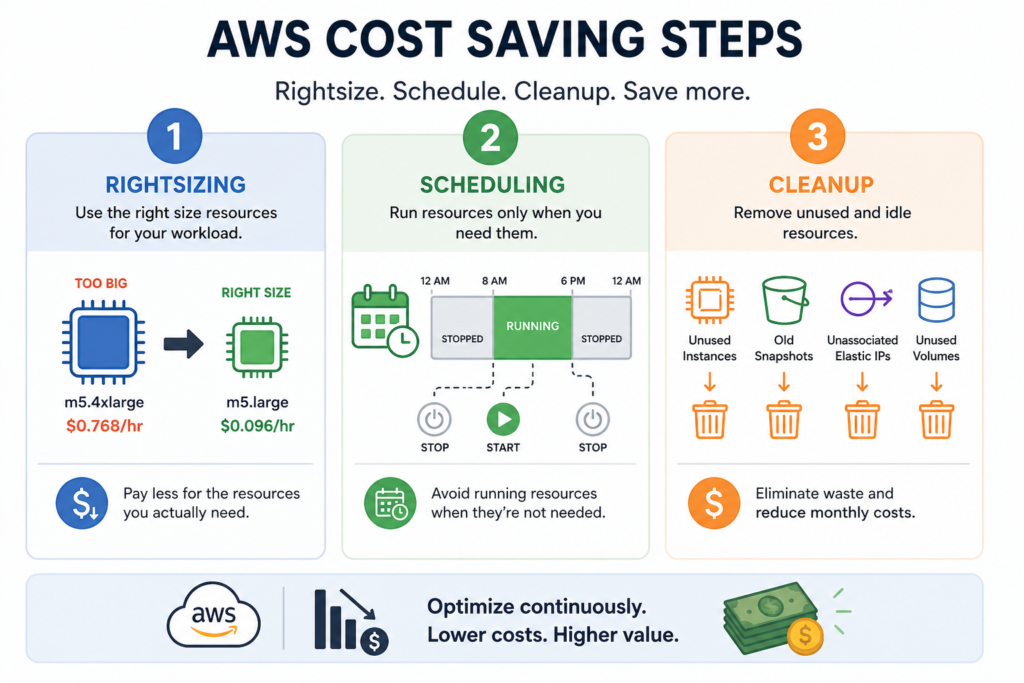
Rightsize means adjusting your instance types and sizes to match actual workload demand. AWS Compute Optimizer analyzes usage and delivers recommendations. Many organizations save up to 25% or more just by rightsizing Windows workloads. ([aws.amazon.com](https://aws.amazon.com/blogs/compute/optimize-ec2-costs-with-aws-compute-optimizer-right-sizing/?utm_source=openai))
2. Use Savings Plans and Reserved Instances strategically
Reserved Instances (RIs) and Savings Plans offer up to ~72% discount versus On‑Demand pricing—Savings Plans cover EC2, Fargate, Lambda; RIs apply to services like RDS, Redshift, ElastiCache. ([docs.aws.amazon.com](https://docs.aws.amazon.com/pdfs/whitepapers/latest/how-aws-pricing-works/how-aws-pricing-works.pdf?INSERT+TRACKING+CODE=&utm_source=openai)) Use Cost Explorer’s recommendation engine to plan purchases. ([docs.aws.amazon.com](https://docs.aws.amazon.com/decision-guides/latest/decision-guides/cost-management-on-aws-how-to-choose.html?utm_source=openai))
3. Leverage Spot Instances for flexible workloads
Spot Instances offer steep discounts (often 70–90% off). Use them for batch processing, non‑critical workloads, or jobs designed to handle interruptions. ([wa.aws.amazon.com](https://wa.aws.amazon.com/wellarchitected/2020-07-02T19-33-23/wat.question.COST_7.en.html?utm_source=openai))
4. Turn off idle or non‑production resources on a schedule
Use AWS Instance Scheduler or Cost Optimization Hub to stop dev/test environments when unused. Shutting down 58% of weekly hours can yield equivalent savings. ([aws.amazon.com](https://aws.amazon.com/getting-started/cost-optimization-essentials/?utm_source=openai))
5. Clean up orphaned and idle resources
Unused EBS volumes, NAT Gateways, idle RDS instances, and CloudWatch logs with infinite retention silently waste money. CLI tools and scripts can identify and remove them. One audit found NAT Gateways costing $32/month each. ([costpatrol.io](https://costpatrol.io/blog/reduce-aws-cost?utm_source=openai))
6. Optimize data transfer and network architecture
Use VPC endpoints for S3/ECR access, reduce cross‑AZ traffic, and configure AZ affinity and RDS replicas to limit inter‑AZ transfers. ([aws.amazon.com](https://aws.amazon.com/getting-started/cost-optimization-essentials/?utm_source=openai))
7. Migrate to cost‑efficient compute platforms (e.g. Graviton)
Graviton processors (ARM‑based) deliver better price‑performance. Compute Optimizer will show when Graviton instances are viable. ([aws.amazon.com](https://aws.amazon.com/blogs/compute/optimize-ec2-costs-with-aws-compute-optimizer-right-sizing/?utm_source=openai))
8. Use the right storage tier and lifecycle policies
Move data in S3 to Intelligent‑Tiering or lifecycle‑configured tiers (e.g. Infrequent Access, Glacier) based on access patterns. ([docs.aws.amazon.com](https://docs.aws.amazon.com/pdfs/decision-guides/latest/cost-management-on-aws-how-to-choose/cost-management-on-aws-how-to-choose.pdf?utm_source=openai))
9. Fix over‑provisioned databases and licensing
Use Aurora Serverless or resize RDS instances; eliminate unnecessary SQL Server licenses—for dev workloads use SQL Developer Edition. ([aws.amazon.com](https://aws.amazon.com/getting-started/cost-optimization-essentials/?utm_source=openai))
10. Clean up container and orchestration waste
Use Savings Plans for Fargate workloads, rightsizes tasks, delete unused ECR images with lifecycle policies. ([docs.aws.amazon.com](https://docs.aws.amazon.com/awssupport/latest/user/cost-optimization-checks.html?utm_source=openai))
11. Improve cost visibility with tagging and tools
Enforce cost allocation tags, use Cost Explorer, Budgets, and Cost Anomaly Detection for proactive visibility. ([docs.aws.amazon.com](https://docs.aws.amazon.com/decision-guides/latest/decision-guides/cost-management-on-aws-how-to-choose.html?utm_source=openai))
12. Forecast and govern cloud spending
Define KPIs, set budgets, organize billing, and monitor trends via AWS Budgets, Billing Conductor, and Cost & Usage Reports. ([docs.aws.amazon.com](https://docs.aws.amazon.com/decision-guides/latest/decision-guides/cost-management-on-aws-how-to-choose.html?utm_source=openai))
13. Adopt Cloud Financial Management (FinOps) discipline
Implement a cloud cost‑aware culture with centralized governance and regular reviews of optimization. ([wa.aws.amazon.com](https://wa.aws.amazon.com/wellarchitected/2020-07-02T19-33-23/wat.pillar.costOptimization.en.html?utm_source=openai))
14. Iterate cost reviews as AWS evolves
Review architecture regularly—new services (e.g. serverless) often offer cheaper alternatives. ([wa.aws.amazon.com](https://wa.aws.amazon.com/wellarchitected/2020-07-02T19-33-23/wat.pillar.costOptimization.en.html?utm_source=openai))
15. Benchmark against peers and strive toward high cost efficiency
Top AWS customers have Cost Efficiency scores ~83 (median); using Savings Plans plus layered optimizations drives the best outcomes. ([aws.amazon.com](https://aws.amazon.com/blogs/aws-cloud-financial-management/the-aws-state-of-cost-efficiency-report/?utm_source=openai))
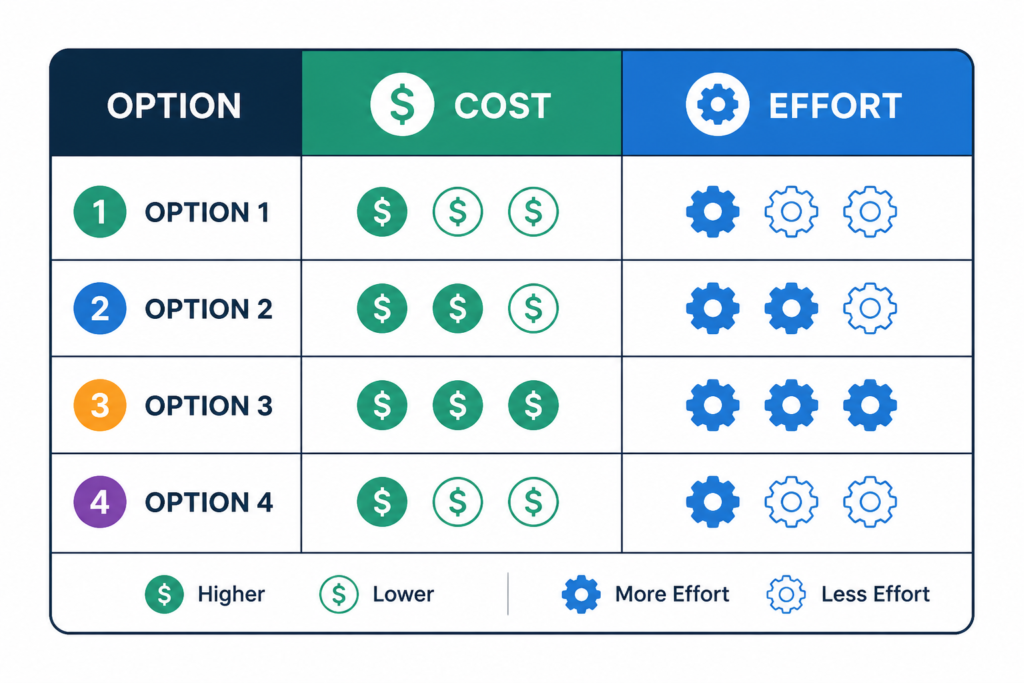
Comparison table: optimization actions, effort vs payoff
| Action | Effort | Estimated impact |
|---|---|---|
| Rightsize compute | Low–medium | ~20–30% |
| Use Savings Plans / RIs | Medium | Up to ~72% |
| Spot Instances | Medium | 70–90% for flexible workloads |
| Shutdown idle resources | Low | ~58% wasted time recoverable |
| Clean orphaned resources | Low | Variable, often tangible per month savings |
What tools support these actions?
- AWS Compute Optimizer – rightsizing recommendations for compute, storage, DB ([aws.amazon.com](https://aws.amazon.com/blogs/compute/optimize-ec2-costs-with-aws-compute-optimizer-right-sizing/?utm_source=openai))
- AWS Cost Explorer – forecast, RI/Savings Plan purchase guidance ([docs.aws.amazon.com](https://docs.aws.amazon.com/decision-guides/latest/decision-guides/cost-management-on-aws-how-to-choose.html?utm_source=openai))
- AWS Trusted Advisor & Cost Optimization Hub – identifies idle or inefficient resources ([docs.aws.amazon.com](https://docs.aws.amazon.com/awssupport/latest/user/cost-optimization-checks.html?utm_source=openai))
- AWS Budgets, Billing Conductor, Cost & Usage Reports – tagging, tracking, visibility ([docs.aws.amazon.com](https://docs.aws.amazon.com/decision-guides/latest/decision-guides/cost-management-on-aws-how-to-choose.html?utm_source=openai))
How to start cutting your AWS bill now?
- Enable Compute Optimizer and Cost Optimization Hub organization‑wide.
- Run recommendations: rightsizing, Savings Plans, idle resource cleanup.
- Implement quick wins—stop dev env after hours, delete zombies, archive logs.
- Buy Savings Plans or RIs for baseline workloads.
- Enforce tagging, set budgets/alerts, assign cost ownership.
- Schedule quarterly cost reviews to iterate.
- Track your Cost Efficiency score—target improvement over time.
Frequently Asked Questions
Q: How much can I expect to save by reducing my AWS bill?
A: Most organizations see 20–40% savings by applying compute rightsizing, purchasing Savings Plans/RIs, and removing idle resources. Some report 50%+ reductions with aggressive cleanup and optimization. ([cloudcostroom.com](https://cloudcostroom.com/blog/the-complete-guide-to-aws-cost-optimization?utm_source=openai))
Q: Should I start with compute or storage optimizations?
A: Compute (rightsizing, pricing models) often has the fastest ROI and lowest effort. But cleaning idle storage, databases, or log retention can also unlock quick wins.
Q: How do Savings Plans compare to Reserved Instances?
A: Savings Plans are more flexible—they apply across compute types (EC2, Lambda, Fargate); RIs are tied to specific services like RDS or Redshift. Use Cost Explorer recommendations. ([docs.aws.amazon.com](https://docs.aws.amazon.com/pdfs/whitepapers/latest/how-aws-pricing-works/how-aws-pricing-works.pdf?INSERT+TRACKING+CODE=&utm_source=openai))
Q: Can using Spot Instances risk my workload?
A: Yes—Spot Instances may be terminated on short notice. They’re best for fault‑tolerant or batch jobs that can checkpoint and resume.
Q: What internal processes support bill reduction?
A: Centralized cost governance (FinOps), tagging policies, budget alerts, and regular reviews make optimization sustainable over time. ([wa.aws.amazon.com](https://wa.aws.amazon.com/wellarchitected/2020-07-02T19-33-23/wat.pillar.costOptimization.en.html?utm_source=openai))
Want to dive deeper into AWS cost control patterns and practices? Check out our pillar around cost optimization: AWS cost optimization hub and related guides: AWS budgeting best practices, AWS Spot vs On‑Demand decision guide.
About the Author
Nhon Dang is a cloud infrastructure and operations professional with over 10 years of hands‑on experience in cloud services, infrastructure, and business operations. His expertise spans the design, deployment, and operation of cloud platforms and managed services. Nhon writes about cloud infrastructure, Kubernetes, DevOps, distributed systems, and cloud service management—sharing practical, experience‑driven guidance.