Last updated: August 31, 2026
This guide shows you exactly how to find and fix oversized EC2 instances on AWS. You’ll use built‑in tools, configure policies for your risk tolerance, and take action—step by step.
What is AWS rightsizing?
AWS rightsizing is the process of aligning your EC2 instance type and size with actual workload demand to reduce waste and improve cost‑efficiency.
Why does oversizing happen and why fix it?
- Lift‑and‑shift migrations often carry forward on‑prem overprovisioned sizing rather than sizing for average use ([d1.awsstatic.com](https://d1.awsstatic.com/whitepapers/cost-optimization-right-sizing.pdf?utm_source=openai)).
- Conservative default sizing or “just to be safe” provisioning leads to underutilized capacity over time.
- Bottom line: rightsizing before or after migration can save 10–70%—some organizations report 35% or more across fleets ([docs.aws.amazon.com](https://docs.aws.amazon.com/prescriptive-guidance/latest/optimize-costs-microsoft-workloads/rightsize.html?utm_source=openai)).
Which AWS tools help with rightsizing?
Two principal services do the heavy lifting:
- AWS Compute Optimizer analyzes CloudWatch metrics (CPU, memory, I/O, network) and classifies instances as over‑provisioned, under‑provisioned, optimized, or idle. It offers tailored resizing recommendations ([aws.amazon.com](https://aws.amazon.com/blogs/compute/optimize-ec2-costs-with-aws-compute-optimizer-right-sizing/?utm_source=openai)).
- AWS Cost Explorer (Cost Optimization Hub) surfaces underutilized EC2 instances across accounts and regions via rightsizing recommendations—especially useful with Cost Optimization Hub enabled ([docs.aws.amazon.com](https://docs.aws.amazon.com/cost-management/latest/userguide/ce-rightsizing.html?utm_source=openai)).
Step‑by‑Step: How to Rightsize EC2 Instances
- Enable Compute Optimizer at the correct scope: for most enterprises, opt‑in org‑wide via Delegated Admin for centralized visibility and least‑privilege ([docs.aws.amazon.com](https://docs.aws.amazon.com/prescriptive-guidance/latest/optimize-costs-microsoft-workloads/rightsize.html?utm_source=openai)).
- Enable memory metrics collection: use the CloudWatch Agent via Systems Manager—ensures memory data is available for recommendations ([docs.aws.amazon.com](https://docs.aws.amazon.com/prescriptive-guidance/latest/optimize-costs-microsoft-workloads/rightsize.html?utm_source=openai)).
- Wait for sufficient data: at least 14 days of CloudWatch usage data is needed; recommendations refresh daily ([aws.amazon.com](https://aws.amazon.com/blogs/compute/optimize-ec2-costs-with-aws-compute-optimizer-right-sizing/?utm_source=openai)).
- Review rightsizing recommendations:
Classification Action Over‑provisioned Downsize instance—good cost saving opportunity Idle Consider stopping, terminating, or consolidating Under‑provisioned Evaluate upsizing or scaling strategy Optimized No action needed - Adjust preferences to match risk appetite: tune CPU utilization threshold (P90/P95/P99.5), CPU and memory headroom (10–30%), and lookback window (14/32/93 days—with 93 days requiring EIM) ([docs.aws.amazon.com](https://docs.aws.amazon.com/compute-optimizer/latest/ug/rightsizing-preferences.html?utm_source=openai)).
- Set preferred instance families: restrict recommendations to families covered by your Savings Plans or Reserved Instances to avoid stranding commitments ([docs.aws.amazon.com](https://docs.aws.amazon.com/pdfs/compute-optimizer/latest/ug/compute-optimizer.pdf?utm_source=openai)).
- Validate platform differences: check architecture, hypervisor, network, I/O—some recommendations may change CPU architecture (e.g., Graviton vs x86) requiring software adaptations ([docs.aws.amazon.com](https://docs.aws.amazon.com/compute-optimizer/latest/ug/view-ec2-recommendations.html?utm_source=openai)).
- Implement changes safely: test downsizing or migration in dev/test. For Auto Scaling groups, use Instance Refresh for seamless updates ([docs.aws.amazon.com](https://docs.aws.amazon.com/compute-optimizer/latest/ug/view-asg-recommendations.html?utm_source=openai)).
- Track before-and-after impact: tag workloads as Rightsizing‑enabled, assign team tags, then compare cost delta in Cost Explorer. Example savings: 56–68% annual cost reduction for overprovisioned workloads ([docs.aws.amazon.com](https://docs.aws.amazon.com/prescriptive-guidance/latest/optimize-costs-microsoft-workloads/rightsize.html?utm_source=openai)).
- Automate and operationalize: use EventBridge, Lambda, or Step Functions to regularly ingest recommendations and trigger resizing actions at scale ([github.com](https://github.com/ferdinandobons/AWSBestPracticesSkill/blob/main/services/management-governance/compute-optimizer.md?utm_source=openai)).
How do you balance cost risk vs. performance risk?
It comes down to tuning recommendation preferences:
- P99.5 threshold + 30% headroom is conservative—higher cost but low risk.
- P90 threshold + 0% headroom pushes for maximum cost savings, but accepts possible spikes.
- “Balanced” preset (P95 + 30% CPU + 30% memory) offers a pragmatic middle ground ([docs.aws.amazon.com](https://docs.aws.amazon.com/compute-optimizer/latest/ug/rightsizing-preferences.html?utm_source=openai)).
Inline illustration: Sample usage metric graph showing threshold/headroom interaction
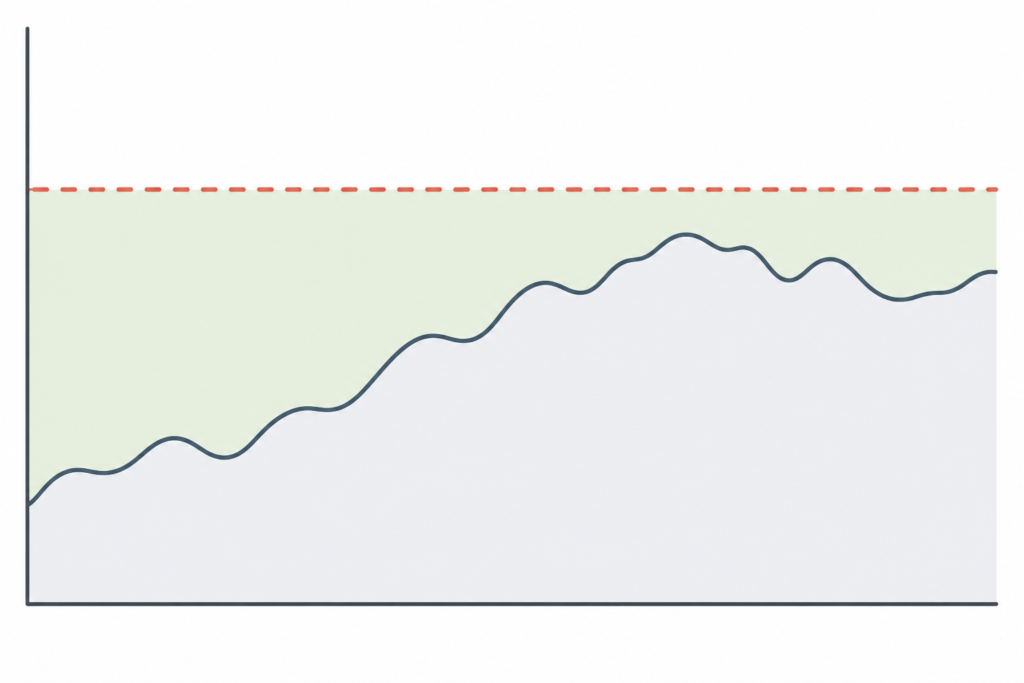
[[inline_image_prompts|Sample utilization graph abstracted to show threshold and headroom overlay]]
Common pitfalls to avoid
- Ignoring memory and I/O usage—only CPU metrics can miss sizing for memory‑heavy workloads.
- Disabling Cost Optimization Hub—leads to unrealistic savings estimates based on On‑Demand rates rather than true discounted rates ([aws.amazon.com](https://aws.amazon.com/blogs/compute/optimize-ec2-costs-with-aws-compute-optimizer-right-sizing/?utm_source=openai)).
- Narrow instance family filters—can reduce recommendation quality and savings opportunity ([docs.aws.amazon.com](https://docs.aws.amazon.com/pdfs/compute-optimizer/latest/ug/compute-optimizer.pdf?utm_source=openai)).
- Lack of tagging makes tracking rightsizing ROI across teams or accounts much harder.
- One‑time efforts yield short‑lived benefits—rightsizing must be continuous, or idle drift creeps back in ([reddit.com](https://www.reddit.com/r/aws/comments/1sja64f/how_do_you_actually_keep_aws_optimization/?utm_source=openai)).
Inline illustration: Simplified rightsizing workflow diagram
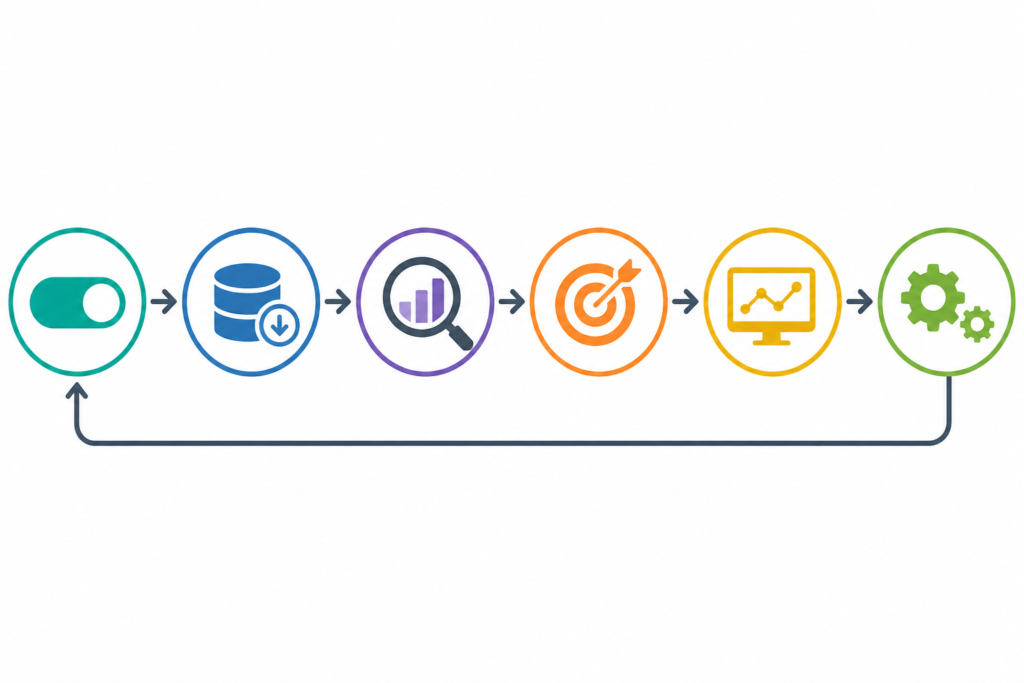
[[inline_image_prompts|Workflow diagram showing steps: enable → collect → review → act → monitor → automate]]
How this fits into AWS cost optimization strategy
Rightsizing is one pillar in cloud cost control. It works best combined with:
- Idle resource cleanup (EBS, RDS, NAT Gateway, etc.) as flagged by Compute Optimizer or Cost Explorer ([aws.amazon.com](https://aws.amazon.com/blogs/compute/optimize-ec2-costs-with-aws-compute-optimizer-right-sizing/?utm_source=openai)).
- Commitment savings via Reserved Instances or Savings Plans.
- Architectural efficiencies—serverless, spot workloads, auto‑scaling, or platform migration.
Link up with foundational resources from your cost optimization pillar: AWS Cost Optimization Hub
Frequently Asked Questions
What is AWS rightsizing? AWS rightsizing is the process of matching EC2 resource size to actual usage to avoid waste and reduce cost.
Which tool should I start with: Cost Explorer or Compute Optimizer? Begin with Compute Optimizer for detailed analysis, then use Cost Explorer’s rightsizing view for cross‑account visibility and pre‑ and post‑cost comparisons.
Can I automate rightsizing actions? Yes. Use EventBridge, Lambda, Step Functions—or native Compute Optimizer Automation rules—for workflow execution at scale.
How much can sizing reduce EC2 cost? Real results vary. Example cases show 35–70% savings on idle fleets, and 50–68% on specific workloads. Evaluate with your own tagging strategy first.
What’s the risk of over‑aggressive downsizing? Using low thresholds (P90) with no headroom increases performance risk during spikes. Mitigate via testing, gradual rollouts, and monitoring.
Do I need custom lookback periods? Yes—14 days is default, but 32 days covers monthly patterns for free, while 93‑day historical view requires EIM and helps handle seasonal workloads better.
About the Author
Nhon Dang is a cloud infrastructure and operations professional with over 10 years of hands‑on experience in cloud services, infrastructure, and business operations. His work bridges technical and business domains in real‑world environments. Nhon writes practical, deeply accurate guidance across cloud infrastructure, Kubernetes, DevOps, and operations.